

Essential Steps for Using Your Backpackboyz Vape Pen Effectively

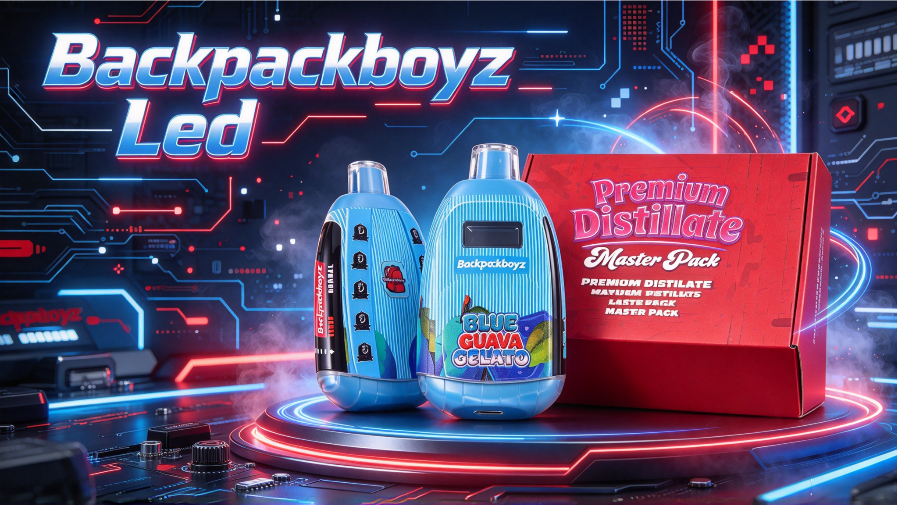
The Backpackboyz vape pen has become a recognizable hardware option for customers looking for a combination of distinctive branding, practical design, and dependable device performance. The latest version also introduces an LED display, giving users more visible information than the previous version without a screen.
For anyone searching for how to use Backpackboyz pen, understanding the basic operating process is only part of the picture. It is equally important to know how to check the device before use, understand the information shown on the display, prepare the hardware correctly, and take care of the battery and device between uses.
This guide walks through the essential steps while highlighting what has changed in the newer Backpackboyz pen.
What Makes the New Backpackboyz Vape Pen Different?
One of the most noticeable changes is the addition of an LED display.
Earlier versions of the Backpackboyz-style pen did not include a screen, so users had less visible information about the device during operation. The newer version adds a display interface that makes device feedback easier to see.
This is a practical hardware upgrade rather than simply a cosmetic change. Instead of relying entirely on the device’s basic indicator light or draw response, users can check the information provided by the display while operating the pen.
For wholesalers, retailers, and vape brands, this type of update is also relevant from a product-development perspective. A familiar product design combined with a more informative interface can make a newer hardware version easier to distinguish from an earlier generation.
How to Use Backpackboyz Pen Step by Step
1. Check the Device Before Use
Before operating a Backpackboyz vape pen, start with a quick inspection.
Check that:
- The packaging is complete and undamaged.
- The device has no visible cracks, deformation, or leakage.
- The mouthpiece and airflow area are unobstructed.
- The battery condition appears normal.
- The LED display or indicator responds as expected.
If you are using an empty or refillable hardware version, make sure it has been prepared according to the product specifications before attempting to activate it.
This simple inspection can help identify a hardware or packaging problem before the device is put into operation.
2. Prepare the Empty Vape Pen Correctly
Some Backpackboyz-style hardware is supplied as empty hardware rather than a pre-filled finished product. In that case, the device needs to be filled with a compatible material according to the hardware manufacturer’s specifications.
Avoid overfilling the chamber. Liquid should also be kept away from the airflow path and electronic components.
After filling, allow sufficient time for the material to properly saturate the heating element before operation. Rushing this preparation step can affect the initial performance of the device.
The exact filling capacity and compatible formulation should always follow the specifications supplied with the particular hardware model.
3. Check the LED Display
The LED display is one of the key differences between the newer Backpackboyz pen and the previous screen-free version.
After preparing the device, check the display before normal operation. Depending on the specific hardware configuration, the display may provide information such as battery status or other device feedback.
This gives users a clearer way to monitor the device instead of relying only on a small indicator light.
For a newer generation vape pen, this is one of the most practical improvements: the device provides more visible feedback while keeping the basic operation straightforward.
4. Activate the Device According to Its Design
Different vape pen configurations can use different activation systems. Some are draw-activated, while others may use a button-based control system.
Always follow the operating instructions supplied with the specific Backpackboyz hardware rather than assuming that every version works in exactly the same way.
For a draw-activated configuration, the device is designed to respond when the user inhales through the mouthpiece. For a button-controlled configuration, the button operation and any available display functions should be checked according to the manufacturer’s instructions.
The goal is simple: use the activation method intended for the hardware rather than repeatedly pressing buttons or attempting to modify the device.
Understanding the LED Display During Use
The LED display is particularly useful because it makes device information more visible.
With the previous version, users had no screen to reference. The newer design gives the device a more informative interface and makes it easier to check its status at a glance.
Depending on the actual hardware specification, the display may be used to communicate information such as:
- Battery status
- Charging status
- Activation feedback
- Other device information supported by the model
The exact information shown can vary between hardware versions, so product-specific specifications should always take priority over general vape-pen instructions.
This is also an important point for wholesale buyers. When evaluating updated hardware, a display should not be viewed simply as an additional visual feature. Its practical value comes from giving users clearer feedback during everyday operation.
Tips for Maintaining Consistent Device Performance
Correct operation is only one part of getting reliable performance from a vape pen. Proper handling and storage also matter.
Keep the Airflow Area Clear
The mouthpiece and airflow path should remain clean and unobstructed. If oil or debris enters the airflow system, it may affect normal operation.
Avoid Overfilling
For refillable hardware, filling beyond the recommended capacity can increase the risk of leakage and may interfere with normal airflow.
Always follow the capacity specified for the particular model.
Store the Device Properly
Avoid exposing the device to extreme temperatures or leaving it in direct sunlight for extended periods.
The FDA specifically recommends protecting vape devices and batteries from extreme temperatures and avoiding charging them in environments where overheating or accidental activation could occur.
Monitor Battery Condition
A rechargeable vape pen should be charged according to the manufacturer’s instructions.
FDA guidance recommends charging vape devices on a clean, flat surface away from materials that can easily catch fire and in a location where the device can be observed.
If a device becomes unusually hot, visibly damaged, swollen, or otherwise behaves abnormally, stop using it and follow the manufacturer’s safety guidance.
Why the New Display Matters for the Backpackboyz Pen
The addition of an LED display gives the newer Backpackboyz pen a different user interface from the previous version.
The comparison can be summarized simply:
| Feature | Previous Version | New Version |
|---|---|---|
| LED Display | No screen | LED display |
| Device Feedback | More limited visual feedback | More visible information |
| Hardware Direction | Original design | Updated interface |
| Operation | Straightforward | Straightforward with additional display feedback |
| User Experience | Basic device feedback | More informative operation |
The key difference is therefore not that the older version becomes irrelevant. Instead, the newer version builds on the existing product concept by adding a more informative interface.
For customers comparing different hardware options, this kind of generation-to-generation improvement can be useful when deciding which features matter for their target market.
What Makes High-Quality Vape Hardware Different?
Product quality should be evaluated through the details of the hardware rather than through marketing language alone.
For a vape pen, important areas include the consistency of the hardware construction, the reliability of the activation system, the quality of the airflow design, the performance of the heating components, the accuracy of the display, and the overall quality-control process.
A well-designed device should also provide clear instructions so that users understand how the hardware is intended to operate.
The newer Backpackboyz pen combines a recognizable product design with an updated LED interface, giving the hardware a more informative operating experience. For brands and wholesale buyers, this makes the display feature one of the main details worth examining when comparing the newer version with earlier hardware.
Common Questions About How to Use Backpackboyz Pen
How do you use a Backpackboyz pen?
Start by checking the device, preparing the hardware according to its specifications if it is an empty or refillable model, checking the LED display, and then using the activation method specified for that particular version.
Does the new Backpackboyz pen have a screen?
Yes. The newer version discussed in this guide features an LED display, which distinguishes it from the earlier version without a screen.
How is the new Backpackboyz pen different from the old version?
The most visible hardware update is the addition of the LED display. The newer version provides more visible device feedback while retaining a straightforward pen-style design.
What can the LED display show?
The exact information depends on the hardware configuration. Depending on the model, it may provide battery or device-status information. Buyers should refer to the specifications for the exact version rather than assuming that every Backpackboyz pen uses the same display functions.
What should I do if the pen does not activate?
First check the battery status, airflow path, device condition, and whether the hardware has been prepared correctly. If the device still does not operate normally, stop using it and contact the manufacturer or supplier for model-specific troubleshooting.
How should a rechargeable vape pen be charged?
Follow the manufacturer’s charging instructions and use the specified charging equipment. FDA guidance recommends charging on a clean, flat surface away from easily flammable materials and avoiding extreme temperatures.
Final Takeaway
The latest Backpackboyz vape pen introduces a meaningful update compared with the previous screen-free version: an integrated LED display that provides more visible device feedback.
For users searching for how to use Backpackboyz pen, the process starts with proper device inspection and preparation, followed by checking the display and using the activation method specified for the hardware. Proper storage, charging, and handling are equally important for maintaining the device.
For wholesalers, distributors, and vape brands evaluating updated hardware, the new Backpackboyz pen combines a recognizable design direction with an updated display interface and a focus on practical everyday operation. The result is a newer hardware option that gives customers more information without making the basic device experience unnecessarily complicated.
As with any electronic vaping product, users should follow the manufacturer’s instructions and applicable local requirements. FDA notes that e-cigarettes can present safety risks, including battery-related fires and overheating, and that users should follow appropriate handling and charging practices.
If you’re interested in these vapes, you can check out the following popular options : backpackboyz 2g led vape | backpackboyz vape bulk | 2g disposable vape | wholesale vapes