

Essential Tips for Using Your Smoothie Bar Blend 3.0 Vape Pen Effectively

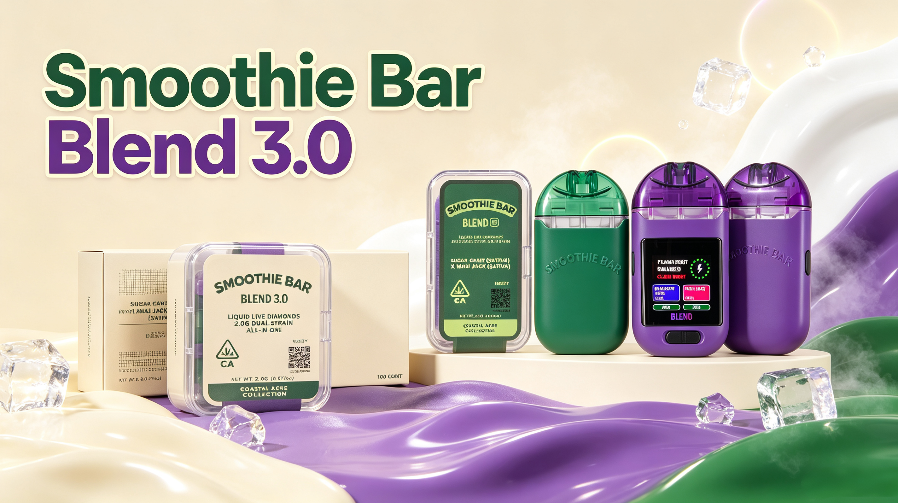
The Smoothie Bar Blend 3.0 Vape Pen brings together two features that make modern disposable hardware more flexible: a dual-chamber design and a full LED display. Instead of using a conventional single-chamber format, the Blend 3.0 allows users to select between two chambers through its control button, while the integrated display provides a clearer view of the device status.
For anyone searching for how to use Smoothie Bar Blend 3.0 vape pen, understanding the controls is the first step. The experience is not simply about taking a draw. Users should know how to check the display, select the desired chamber, operate the button correctly, and handle the device according to the manufacturer’s instructions.
For wholesale buyers, these functions also make the Smoothie Bar Blend 3.0 an interesting hardware format to consider. Its dual-chamber construction, full LED interface, complete presentation, and U.S. warehouse availability give distributors and retailers several product features to evaluate when building their hardware selection.
What Makes the Smoothie Bar Blend 3.0 Vape Pen Different?
Before learning how to use Smoothie Bar Blend 3.0 vape pen, it helps to understand how the device is designed.
Full LED Display
The full LED display is one of the most visible features of the Blend 3.0. Rather than relying only on a small indicator light, the device provides a larger interface for displaying relevant device information.
Depending on the specific hardware configuration, the display can help users monitor information such as battery or chamber-related status. This makes it easier to understand the condition of the device before and during use.
For a dual-chamber product, the display can also make chamber selection easier to follow because users have a visible interface rather than relying entirely on an external indicator.
Dual-Chamber Design
The Smoothie Bar Blend 3.0 uses a dual-chamber structure, allowing two separate chambers to be incorporated into one device.
This format can be useful when users want access to two different options without carrying two separate devices. Instead of changing hardware, the user can select the desired chamber through the device’s button control.
The dual-chamber structure is therefore more than a visual feature. It changes how the device is operated and gives the product a different position compared with conventional single-chamber hardware.
Button-Controlled Chamber Switching
Another key feature is the control button.
The button allows users to select between the two chambers according to the device’s operating instructions. This makes it important to understand the control system before taking a draw.
Because button functions can vary between hardware configurations, users should always follow the operating instructions supplied with their specific device rather than assuming that every dual-chamber vape uses the same button sequence.
How to Use Smoothie Bar Blend 3.0 Vape Pen: Step-by-Step Guide
If you are learning how to use Smoothie Bar Blend 3.0 vape pen, the following general process provides a simple starting point.
Step 1: Inspect the Device Before Use
Start by checking the device and its packaging.
Look for:
- Visible damage to the device
- Cracks or deformation
- Unusual leakage
- Damage around the mouthpiece
- Problems with the charging connection, if applicable
- Any unusual smell or appearance
If a device appears damaged or defective, do not continue using it. Contact the manufacturer or supplier for guidance.
FDA guidance also recommends understanding the manufacturer’s recommendations for the use and care of vape devices and contacting the manufacturer when instructions are unavailable or unclear.
Step 2: Check the LED Display
Before activating the device, look at the full LED display.
The display is designed to make device information easier to see, so take a moment to understand what the current screen is showing.
Depending on the hardware configuration, this may include battery-related or chamber-related information.
If the display shows an unexpected warning or the device behaves abnormally, stop using it and check the product instructions.
Step 3: Select the Desired Chamber
The next step is selecting the chamber you want to use.
Because the Smoothie Bar Blend 3.0 is a dual-chamber vape pen, the device provides two chamber options within one piece of hardware.
Use the control button according to the manufacturer’s instructions and check the display to confirm the selected chamber.
This step is particularly important for new users. Taking a moment to confirm the selected chamber can help avoid unintentionally activating the wrong option.
Step 4: Take a Gentle Draw
Once the desired chamber has been selected, use the device according to its operating instructions.
Avoid unnecessarily pressing the control button repeatedly or attempting to modify the device.
The objective is simple:
Select → Confirm → Use
Keeping the operating process straightforward can make the dual-chamber design easier to understand.
Step 5: Switch Between the Two Chambers
One of the main reasons to choose a dual-chamber format is the ability to change between two options without changing the entire device.
When you want to switch chambers:
- Stop using the device.
- Use the control button according to the manufacturer’s instructions.
- Check the LED display.
- Confirm that the desired chamber has been selected.
- Continue using the device as directed.
The exact button sequence should always come from the hardware instructions because operating systems can vary between models and production configurations.
How to Make Better Use of the Full LED Display
A full LED display can provide more information than a simple indicator light, but its usefulness depends on understanding what the display is communicating.
Monitor Device Status
Check the display before use and whenever the device behaves differently from expected.
A visible interface can make it easier to identify the device’s current status without guessing from a single flashing light.
Confirm Chamber Selection
For a dual-chamber device, one of the practical advantages of a display is being able to verify the selected chamber.
This creates a simple operating relationship:
LED Display → Button Control → Chamber Selection → Use
That combination is one of the defining features of the Smoothie Bar Blend 3.0.
Pay Attention to Unusual Indicators
If the display shows an unexpected message or the device becomes unusually hot, stops functioning normally, or shows another abnormal behavior, discontinue use and consult the manufacturer’s instructions or supplier.
Common Mistakes When Using a Dual-Chamber Vape Pen
A dual-chamber vape pen has more functions than a basic single-chamber device, so a few simple mistakes are worth avoiding.
1. Not Checking Which Chamber Is Selected
With two chambers in one device, users should confirm the selected option before use.
2. Pressing the Button Repeatedly
Repeatedly activating the control button without understanding its function can lead to unnecessary device activation.
Follow the operating instructions instead of experimenting with different button combinations.
3. Ignoring the LED Display
The display is an important part of the Blend 3.0’s user interface. If the device provides status information through the screen, checking it can make operation more straightforward.
4. Using a Damaged Device
Do not continue using hardware that is cracked, damaged, leaking, or behaving abnormally.
FDA guidance notes that battery-related problems can contribute to overheating, fires, and explosions, and recommends following manufacturer instructions for device care and charging.
5. Charging Without Following the Manufacturer’s Instructions
For rechargeable configurations, use the recommended charging method and follow the manufacturer’s instructions.
FDA recommends charging vape devices on a clean, flat surface away from easily flammable materials and avoiding charging or storing devices in extreme temperatures.
How to Maintain Your Smoothie Bar Blend 3.0 Vape Pen
Good hardware handling is important for maintaining a consistent product experience.
Keep the mouthpiece and airflow area clean and unobstructed. Avoid exposing the device to water, excessive heat, direct sunlight for prolonged periods, or extremely cold conditions.
Do not leave a rechargeable device charging unattended or place it on soft surfaces such as a bed or pillow while charging. FDA specifically recommends charging on a clean, flat surface where the device can be clearly observed.
If the device becomes damaged, unusually hot, or begins behaving unexpectedly, stop using it and contact the manufacturer or supplier.
Why Dual-Chamber Hardware Matters for Wholesale Buyers
The Smoothie Bar Blend 3.0 is not only designed around everyday operation. Its hardware configuration also gives wholesale buyers several product characteristics to evaluate.
A More Distinctive Hardware Format
A dual-chamber design gives retailers and distributors something different from conventional single-chamber hardware.
The ability to select between two chambers through button control creates an additional product feature that can be highlighted when presenting the device to customers.
Full LED Display
The full LED interface adds another visible hardware feature.
For wholesale buyers, product differentiation can matter when comparing multiple disposable hardware formats. A larger display, dual-chamber structure, and button-controlled operation give the Blend 3.0 several concrete specifications to discuss.
Complete Product Presentation
Hardware quality is only one part of a wholesale product.
Packaging, device appearance, consistency between batches, and overall presentation can also influence how a product fits into a distributor’s or retailer’s assortment.
For businesses sourcing private-label or branded hardware, these factors can be considered alongside MOQ, customization requirements, lead times, and packaging specifications.
Smoothie Bar Blend 3.0 Wholesale From a U.S. Warehouse
For U.S.-based wholesale buyers, inventory location can be an important sourcing consideration.
The Smoothie Bar Blend 3.0 is available from the U.S. warehouse listed by NextVapePro, giving buyers a domestic-stock option when available.
For distributors and businesses, U.S. warehouse inventory can simplify the sourcing process compared with relying exclusively on overseas fulfillment. Buyers should still confirm current stock, shipping availability, product specifications, and applicable market requirements before placing an order.
Pricing can also be discussed according to order quantity and sourcing requirements.
If you are comparing wholesale hardware, consider asking about:
- Current U.S. warehouse inventory
- Available quantities
- Wholesale pricing
- Packaging options
- Product specifications
- Customization requirements
- Shipping arrangements
- Applicable compliance documentation
A Note on the U.S. Vape Market in 2026
The U.S. regulatory environment for electronic nicotine delivery systems remains important for wholesalers and distributors.
As of 2026, the FDA states that new tobacco products, including ENDS, generally require the applicable premarket authorization before they can be lawfully marketed in the United States. The agency has also continued issuing marketing orders for specific products during 2026 and taking enforcement action against unauthorized products.
This means that U.S. warehouse availability should not automatically be interpreted as nationwide authorization or legality for every buyer, product configuration, or use case.
Wholesale buyers should independently verify the regulatory status and applicable requirements for the specific product and market in which they intend to sell.
For businesses sourcing empty hardware or other components, the relevant regulatory considerations can also depend on how the product is configured, marketed, filled, and ultimately sold.
Frequently Asked Questions
How do you use Smoothie Bar Blend 3.0 vape pen?
First inspect the device, check the LED display, select the desired chamber using the control button according to the manufacturer’s instructions, confirm the selection, and use the device as directed.
How do you switch chambers on Smoothie Bar Blend 3.0?
Use the control button according to the device’s operating instructions and confirm the selected chamber through the LED display. The exact button sequence should be verified against the instructions for the specific hardware configuration.
Is Smoothie Bar Blend 3.0 a dual-chamber vape pen?
Yes. The Blend 3.0 uses a dual-chamber design that allows two chambers to be incorporated into one device.
What is the purpose of the full LED display?
The full LED display provides a more visible interface for device information and can help users understand the current device or chamber status.
Can I buy Smoothie Bar Blend 3.0 wholesale?
Yes. Wholesale buyers can contact NextVapePro to discuss available quantities, product specifications, U.S. warehouse inventory, and pricing.
Is Smoothie Bar Blend 3.0 available from a U.S. warehouse?
NextVapePro lists the Smoothie Bar Blend 3.0 as available from U.S. warehouse inventory. Buyers should confirm current stock and fulfillment details before ordering.
Is wholesale pricing negotiable?
Wholesale pricing can be discussed according to order quantity, configuration, packaging requirements, and other sourcing conditions.
Final Thoughts
The Smoothie Bar Blend 3.0 combines several hardware features into one compact format: dual chambers, button-controlled chamber selection, and a full LED display.
For users, learning how the display and control button work is the key to using the device correctly. For wholesale buyers, the same features provide concrete points to evaluate when comparing dual-chamber hardware for a product lineup.
If you are sourcing Smoothie Bar Blend 3.0 vape pens wholesale, NextVapePro can provide information about current U.S. warehouse availability, quantities, product specifications, and wholesale pricing. Contact the team to discuss your sourcing requirements and available options.
If you’re interested in these vapes, you can check out the following popular options : USA smoothie bar blend 3.0 dual 2g pen | smothie bar vape wholesale | 2 gram disposable | wholesale vapes